What an AI visibility tool measures
Every tool in the category does a version of the same four things. It runs a list of prompts through one or more AI engines on a schedule, records whether your brand appears in each answer, records which sources the answer cited, and turns the results into a few numbers you can watch over time.
The numbers vary by vendor but reduce to these. They are the numbers I report inside the GEO part of my SEO, GEO, and AEO services.
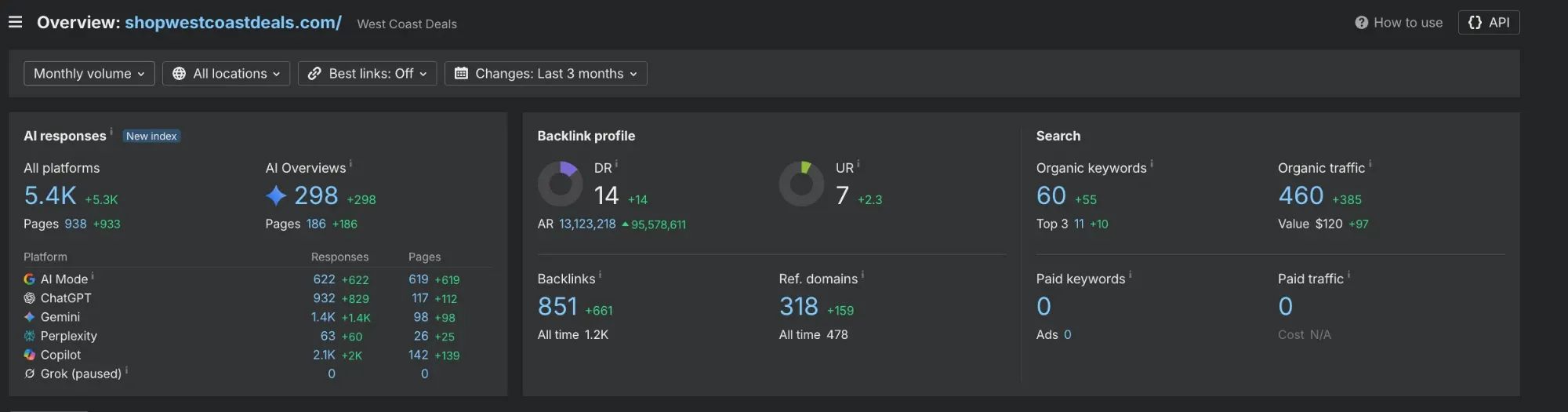
- Mention rate. The share of prompts in which you are named. Tracked per engine, because being named in Gemini and absent from ChatGPT is common.
- Share of voice. How often you are named compared with the competitors on the same prompts. This is the one that tells you whether you are gaining or losing.
- Citations. Which pages and domains the engine pulled from when it answered. For a local business this is the most useful column in the whole report, because it is a list of the sources you need to be on.
- Sentiment and position. Whether you were the first pick, a runner-up, or a caveat, and whether what was said was positive. Named with a warning about your hours is a different result from named as the best.
The tools, by kind
As of September 2026 the market has three shapes. Pricing changes monthly across all of them, so check it directly rather than trusting any figure in a blog post, including this one.
- Add-ons inside SEO suites. Ahrefs Brand Radar and Semrush's AI toolkit sit inside tools many agencies already pay for. They report mentions and citations across the major engines at a scale the free method cannot match, and they are priced for agencies and larger businesses.
- Dedicated trackers. Profound, Peec AI, Otterly, and others built for this alone. Daily prompt runs, competitor comparison, citation analysis, and reporting. Built for brands with many products or many locations, where the prompt list runs to hundreds.
- Lightweight monitors. Smaller tools that run a short prompt list weekly and email a summary. Closer to what a single-location business needs, and the category most likely to change month to month.
Who needs one
A tracker earns its cost when the prompt list is too long to run by hand or the answers change too fast to check monthly. That describes a brand with dozens of products, an agency watching thirty clients, or a company with locations in ten cities.
It does not describe a Portland roofer. A single-location trade has a prompt list of ten to fifteen questions, three engines worth checking, and a monthly cadence that is fast enough to act on. That is an hour of work, and the spreadsheet you build doing it is more useful than most dashboards, because you read every answer yourself and see what was cited. The heating company captures show why every engine has to be read: ChatGPT and Gemini named different companies for the same question.
Start with the free method. Buy a tool when the list outgrows the hour.
The free method, in full
Four steps, one spreadsheet, once a month. The prompt list itself is in the AI visibility post; this is the mechanics.
First, the prompts. Ten to fifteen questions a real customer would ask, covering the headline recommendation, each main service, each city you work in, emergency and after-hours, and one question about your business by name. Keep the list fixed so months compare.
Second, the run. The same day each month, in a browser you are not signed in to, ask each prompt in ChatGPT, Gemini, and Google's AI Mode. Copy the answer into the sheet. It takes longer the first time and about an hour after that. The electrician check is one prompt with a town and a constraint, and it is the cheapest first run.
Third, the columns. One row per prompt per engine, laid out like this.
| Column | What goes in it |
|---|---|
| Prompt | The exact wording, kept identical every month |
| Engine | ChatGPT, Gemini, or AI Mode |
| Named | Yes or no |
| Position | First pick, runner-up, caveat, or absent |
| Competitors named | Every other business in the answer |
| Sources cited | Every domain the answer linked or credited |
| Note | Anything the answer said about you, hours and services especially |
The two numbers to watch
Fourth, the summary. Two numbers per month are enough.
Your mention count: how many of the rows named you, out of the total. Ten prompts in three engines is thirty rows; being named in six of them is a mention rate of one in five. Watch that fraction over months.
Your citation gaps: every source that appeared in the cited column for a competitor and never for you. That list, sorted by how often each source appears, is the work order for the next month. In the Portland examples it would have read BBB, the Oregon CCB lookup, Angi, Yahoo Local, Birdeye, and Expertise.
The analytics side
Visibility is one half. The other is whether anyone arrives from an AI answer, and that part is already in your analytics if you know where to look.
In GA4, referrals from chatgpt.com, perplexity.ai, copilot.microsoft.com, and gemini.google.com show up as ordinary referral sources. Build one report or one segment that groups them, and you have a monthly count of visits that came from an AI answer. It will be small at first. The point is the direction.
Google's AI Overviews are the exception. Clicks from an Overview arrive as normal Google search traffic and are not separated in Search Console, so there is no clean count for them. Treat them as part of organic and measure the Overviews themselves with the prompt list.
What to do with the results
The sheet tells you two things: how often you are named, and what the engines read when they named someone else. Act on the second. Get on each cited source with facts that match your site and your other listings, write the service or area page that the prompt was really about, and re-run the list next month.
The trackers will tell you the same thing with better charts. Until the list is longer than an hour, the sheet is enough. The free consultation fills the first sheet in for you and hands back the citation gaps.
Frequently asked questions
- What is an AI visibility tool?
- Software that runs a list of prompts through AI engines on a schedule, records whether your business is named and which sources were cited, and reports mention rate, share of voice, and citations over time.
- Do I need an AI visibility tool for a small business?
- Usually not. A single-location business has a prompt list of ten to fifteen questions and three engines to check, which is an hour a month by hand. Trackers earn their cost when the list is too long to run by hand or you have many locations.
- How do I track AI visibility for free?
- A fixed prompt list, run monthly in ChatGPT, Gemini, and Google's AI Mode from a signed-out browser, recorded in a spreadsheet with columns for named, position, competitors, and sources cited. Watch your mention count and the sources cited for competitors but never for you.
- Can I see AI traffic in Google Analytics?
- Yes for ChatGPT, Perplexity, Copilot, and Gemini, which appear as referral sources you can group in one report. Clicks from Google's AI Overviews are not separated from normal search traffic, so measure those with the prompt list instead.
- Which AI engines should I check?
- ChatGPT, Gemini, and Google's AI Mode cover most of the questions a local customer asks. Add Perplexity if your customers are technical. Check all of them, because a business is often named in one and absent from another.
Want the sheet filled in for you?
The consultation runs the prompt list for your trade in three engines and hands you the spreadsheet, the citation gaps, and the order to close them in. The consultation is free, and the pricing is published.