What an inventory aging report actually is
An aging report groups on-hand inventory into buckets by time in stock, usually 0–30, 31–60, 61–90 and 90+ days, and shows what you're holding in each.
The concept is borrowed from accounts receivable aging, where the buckets exist because the probability of collecting a debt drops as it ages. Inventory works the same way. The probability that a unit sells at full price drops the longer it sits, and unlike a receivable, it costs you money to keep waiting.
That's the whole premise: time in stock is a leading indicator of margin loss. An aging report is how you see it coming. It is the forward-looking companion to the inventory turnover ratio, and the report the inventory tools I build for stores start from.
The five columns it needs
Most aging reports have three. Here's what the missing two do.
Age alone can't tell a slow-and-steady seller apart from a dead one. Age plus velocity can. Any aging report without a velocity column will eventually push you to discount something that was fine.
- Variant-level identity. not the style, the variant. In footwear and apparel this is the biggest failure point: a style shows a healthy average age while three sizes sold out in two weeks and the rest of the run has been sitting since spring. Roll up to the style and the data cancels itself out.
- Days since receipt. Days since these units physically arrived. If you replenished a SKU three times, the clock for the units on the shelf shouldn't reset every time a fresh case lands.
- Units on hand. the easy one.
- Cost basis of the aged units. the first commonly missing column, and what converts the report from interesting to urgent. Two hundred units aged 90+ days is a number. $34,000 in capital sitting in 90+ day inventory is a decision. Same data; only one of them gets acted on. GMROI is what that capital should be returning.
- Recent sales velocity. the second missing column, and the one that prevents the expensive mistake. An item aged 120 days that sold six units last week is not dead. It's slow and steady, and marking it down throws away margin you would have collected anyway.
Why ERP aging reports disappoint multi-channel sellers
If you run NetSuite, Fishbowl or any comparable ERP, you have an aging report available. It's usually a disappointment, and the reasons are structural rather than anyone's fault.
Rather than assume your ERP can't do it, run this test: pull an aging report and check whether it can answer which specific variant, at what cost basis, has sat longest without selling, and on which channel. If the answer is yes, use it. If any part of that question can't be answered, the report will need assembling outside the ERP, usually by joining warehouse on-hand data against per-channel sales exports.
That join is unglamorous and it's where most of the work is. It's also why aged inventory persists at businesses that are otherwise well run: nobody can see it in one place. That join is also the case for custom inventory software in one sentence.
- They age at the part level. ERPs are built around parts and items. Retail lives at the variant level. If your system treats a style as one item with a quantity, the aging clock is averaged across a size run and the signal is gone before you see it.
- They only know one channel. your ERP knows what shipped. It usually doesn't know the unit is listed on five marketplaces, that it's moving on two of them, or that the platform with the fastest velocity also charges the highest commission.
- Receipt date isn't always the receiving event. depending on how POs and transfers are configured, the date the system stamps may reflect when someone keyed it rather than when the pallet showed up. Worth checking before you trust the buckets.
Reading it: four patterns worth knowing
Once the report is right, four patterns show up repeatedly.
- Old with velocity. aged past 90 days but still selling weekly. Leave it alone. Its turn is slow because depth was too high at buy. Fix it at the next reorder.
- Old without velocity. aged and flat. This is the actual dead stock. It doesn't get better, and every week you wait the markdown has to be deeper to move the same unit.
- Young without velocity. under 30 days and hasn't sold. Usually not a problem yet, but if a receipt from six weeks ago has moved nothing while comparable receipts moved 20%, that's the earliest possible warning, and the single most valuable signal on the report. You can still act while a 10% markdown would be enough.
- Old with velocity on one channel only. slow overall, healthy on a single platform. That's not an inventory problem, it's a listing problem, usually pricing or listing quality somewhere else in the stack.
What to do with it
An aging report is only worth building if something happens when a row crosses a threshold. Tie it to a ladder. The age-first ladder that catches dead stock early is the one I use.
Two rules keep this from costing you money. Protect the fast movers: anything selling above a velocity floor is exempt regardless of age, because age is a proxy for "won't sell" and direct evidence beats a proxy. And set a margin floor: a markdown that takes a unit below cost is not a markdown, it's a decision to lose money, and it should be made on purpose.
The ladder matters less than the automation. Discounting by feel means discounting when you happen to notice, and you notice late, usually a full season late, when the markdown has to be twice as deep to do the same job. The free consultation pulls this report from your own exports as its first step.
| Age | Status | Action |
|---|---|---|
| Under 30 days | Fresh | No action |
| 30–45 days | Healthy | Monitor |
| 46–60 days | Watch | −10% |
| 61–90 days | Markdown | −20% |
| 91+ days | Fire Sale | −30% |
Frequently asked questions
- What is an inventory aging report?
- A report that buckets on-hand inventory by time in stock so you can see which units are approaching the point where they stop being worth holding. It's the difference between knowing what you own and knowing what you own that's going bad.
- What should be in an inventory aging report?
- Variant-level identity, days since receipt, units on hand, cost basis of the aged units, and recent sales velocity. The last two are the ones most reports omit, and they're the ones that turn the report into a decision.
- How do I get an inventory aging report out of NetSuite or another ERP?
- Most ERPs will produce one at the item level using receipt date. The gaps to check for are variant-level granularity, whether the aging clock reflects the actual receiving event, and whether channel-level sales velocity can be joined in. If any of those are missing, the report needs assembling outside the ERP.
- How often should you run an inventory aging report?
- Weekly if you're taking markdown action from it, monthly if you're only reviewing. Less than monthly and you learn about aged stock after the markdown has to be deep enough to hurt.
- What's the difference between an aging report and an inventory turnover report?
- Turnover is backward-looking and blended. It tells you how the whole business performed. Aging is forward-looking and specific. It tells you which individual units are about to become a problem. You need both, but only one of them is actionable this week.
See it on your own inventory
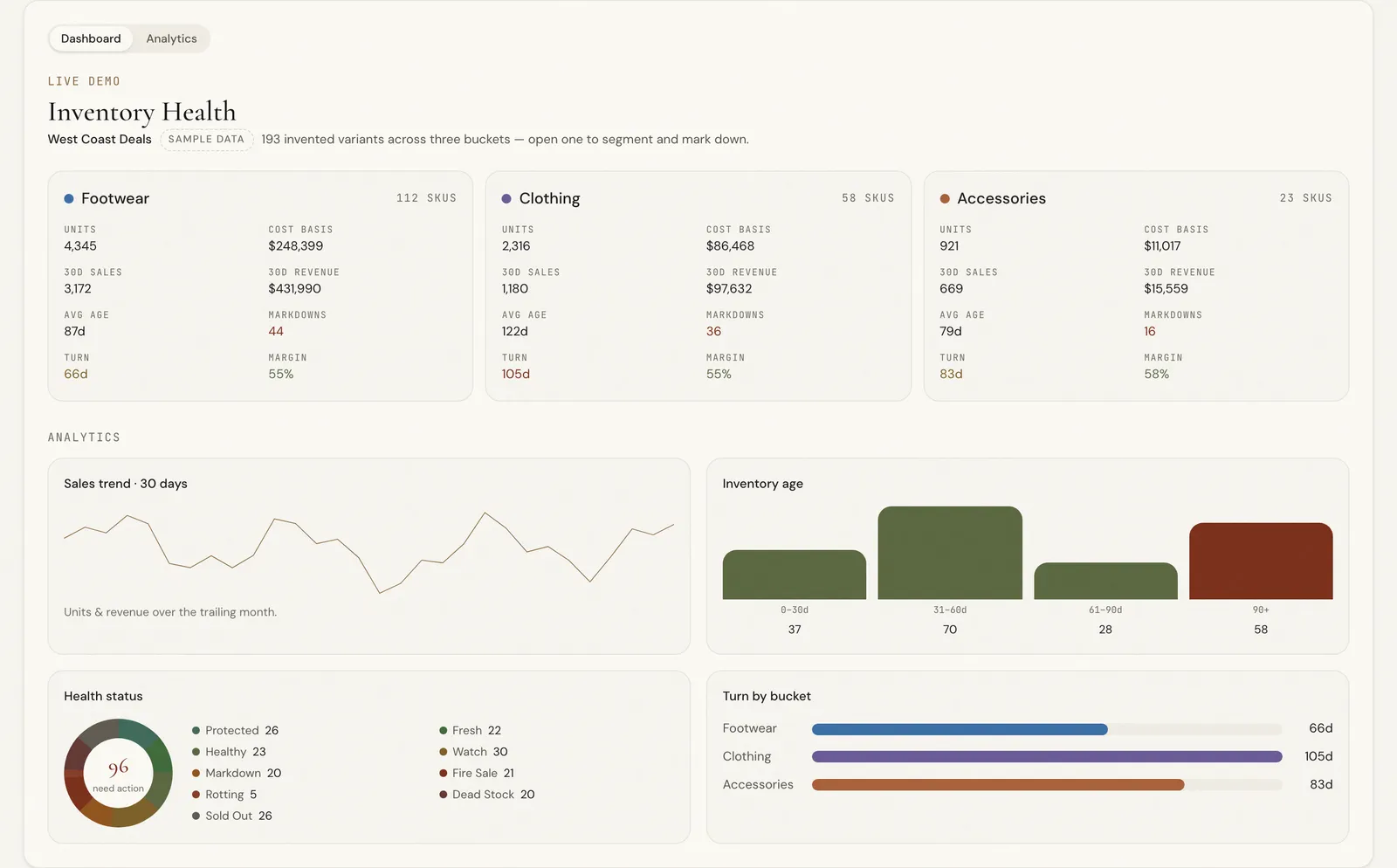
The Inventory Health Dashboard is this report, built. It scores every variant on age, velocity and days of supply, applies the ladder above automatically, and flags markdown candidates before the markdown has to be deep, with cost-basis checking so nothing drops below your floor. One client operation marks down the long tail every day instead of once a season.